<?xml version="1.0" encoding="windows-1252"?><feed version="0.3" xmlns:wfw="http://wellformedweb.org/CommentAPI/" xmlns:slash="http://purl.org/rss/1.0/modules/slash/" xmlns:trackback="http://madskills.com/public/xml/rss/module/trackback/" xmlns="http://purl.org/atom/ns#" xml:lang="it-it">
	<title>Blog</title>
	<link rel="alternate" type="text/html" href="http://www.juniorsoft.it/dblog/" />
	<tagline type="text/html">Blog</tagline>
	<id>http://www.juniorsoft.it/dblog/</id>
	<generator url="http://www.juniorsoft.it/dblog/feedatom.asp" version="Blog">Blog 2.0</generator>
	<author>
		<name>Blog</name>
		<url>http://www.juniorsoft.it/dblog/</url>
	</author>
	<modified>2020-07-22T14:32:50+01:00</modified>
	<entry>
		<title><![CDATA[Windows server 2016 e 2019 : impossibile accedere alle condivisioni sul NAS]]></title>
		<id>http://www.juniorsoft.it/dblog/articolo.asp?articolo=24</id>
		<created>2020-07-22T14:32:50+01:00</created>
		<content type="text/html" mode="escaped"><![CDATA[Dopo avere installato windows server 2016 o 2019 o windows 10 Enterprise non si riesce ad accedere alle condivisioni presenti sul NAS.

A ogni  tentativo di accesso riceviamo l’errore “Non puoi accedere a questa cartella condivisa perch&eacute; i criteri di sicurezza dell’organizzazione bloccano l’accesso guest non autenticato”
l problema &egrave; dovuto al fatto che windows utilizza, come default, il client SMB2 con l’accesso Guest disabilitato.

Infatti, Windows Server 2016, 2019 e Windows 10 Enterprise, come impostazione predefinita, impediscono a un utente  di connettersi a una share remota utilizzando credenziali guest, anche se il server remoto lo richiede.

Ecco la soluzione al problema:

Abilitare il protocollo SMB1 (necessario per individuare i computer sulla rete e sfogliarne le condivisioni)
Eseguire il comando “gpedit.msc” e, dopo avere navigato fino a Configurazione computer\modelli amministrativi\rete\Workstation Lanman, abilitare il parametro “Attiva accessi ospiti non sicuri“
A questo punto basta eseguire il comando gpupdate ed il gioco &egrave; fatto.
]]></content>
		<link rel="alternate" type="text/html" href="http://www.juniorsoft.it/dblog/articolo.asp?articolo=24"/>
		<issued>2020-07-22T14:32:50+01:00</issued>
		<modified>2020-07-22T14:32:50+01:00</modified>
		<slash:comments>0</slash:comments>
		<wfw:comments>http://www.juniorsoft.it/dblog/articolo.asp?articolo=24#commenti</wfw:comments>
	</entry>
	<entry>
		<title><![CDATA[Windows server 2016 e 2019 : impossibile accedere alle condivisioni sul NAS]]></title>
		<id>http://www.juniorsoft.it/dblog/articolo.asp?articolo=25</id>
		<created>2020-07-22T14:32:50+01:00</created>
		<content type="text/html" mode="escaped"><![CDATA[Dopo avere installato windows server 2016 o 2019 o windows 10 Enterprise non si riesce ad accedere alle condivisioni presenti sul NAS.

A ogni  tentativo di accesso riceviamo l’errore “Non puoi accedere a questa cartella condivisa perch&eacute; i criteri di sicurezza dell’organizzazione bloccano l’accesso guest non autenticato”
l problema &egrave; dovuto al fatto che windows utilizza, come default, il client SMB2 con l’accesso Guest disabilitato.

Infatti, Windows Server 2016, 2019 e Windows 10 Enterprise, come impostazione predefinita, impediscono a un utente  di connettersi a una share remota utilizzando credenziali guest, anche se il server remoto lo richiede.

Ecco la soluzione al problema:

Abilitare il protocollo SMB1 (necessario per individuare i computer sulla rete e sfogliarne le condivisioni)
Eseguire il comando “gpedit.msc” e, dopo avere navigato fino a Configurazione computer\modelli amministrativi\rete\Workstation Lanman, abilitare il parametro “Attiva accessi ospiti non sicuri“
A questo punto basta eseguire il comando gpupdate ed il gioco &egrave; fatto.
]]></content>
		<link rel="alternate" type="text/html" href="http://www.juniorsoft.it/dblog/articolo.asp?articolo=25"/>
		<issued>2020-07-22T14:32:50+01:00</issued>
		<modified>2020-07-22T14:32:50+01:00</modified>
		<slash:comments>0</slash:comments>
		<wfw:comments>http://www.juniorsoft.it/dblog/articolo.asp?articolo=25#commenti</wfw:comments>
	</entry>
	<entry>
		<title><![CDATA[SOLUZIONE ERRORE IIS 500.21]]></title>
		<id>http://www.juniorsoft.it/dblog/articolo.asp?articolo=23</id>
		<created>2018-01-18T17:02:19+01:00</created>
		<content type="text/html" mode="escaped"><![CDATA[l seguente errore:
Nell'elenco moduli del gestore "PageHandlerFactory-Integrated" &egrave; presente un modulo "ManagedPipelineHandler" non valido. 
Compare se .NET &egrave; stato installato prima di IIS (o pi&ugrave; probabile, IIS &egrave; stato disinstallato e reinstallato a seguito di problemi vari).

La soluzione &egrave; molto semplice:

1) aprite il cmd.exe

2) cd "%windir%\Microsoft.NET\Framework64\v4.0.30319"

3) aspnet_regiis –i
]]></content>
		<link rel="alternate" type="text/html" href="http://www.juniorsoft.it/dblog/articolo.asp?articolo=23"/>
		<issued>2018-01-18T17:02:19+01:00</issued>
		<modified>2018-01-18T17:02:19+01:00</modified>
		<slash:comments>9569</slash:comments>
		<wfw:comments>http://www.juniorsoft.it/dblog/articolo.asp?articolo=23#commenti</wfw:comments>
	</entry>
	<entry>
		<title><![CDATA[Virtual Machine free per testare siti web]]></title>
		<id>http://www.juniorsoft.it/dblog/articolo.asp?articolo=22</id>
		<created>2015-07-17T16:37:50+01:00</created>
		<content type="text/html" mode="escaped"><![CDATA[http://dev.modern.ie/tools/vms/windows/]]></content>
		<link rel="alternate" type="text/html" href="http://www.juniorsoft.it/dblog/articolo.asp?articolo=22"/>
		<issued>2015-07-17T16:37:50+01:00</issued>
		<modified>2015-07-17T16:37:50+01:00</modified>
		<slash:comments>2051</slash:comments>
		<wfw:comments>http://www.juniorsoft.it/dblog/articolo.asp?articolo=22#commenti</wfw:comments>
	</entry>
	<entry>
		<title><![CDATA[How to give alias to the SQL Linked Server]]></title>
		<id>http://www.juniorsoft.it/dblog/articolo.asp?articolo=21</id>
		<created>2014-07-02T18:13:21+01:00</created>
		<content type="text/html" mode="escaped"><![CDATA[There are no problems to add SQL linked server to the specific host running it. <br />But what if you need to give it an alias, rather than use hostname as linked server name? <br />Here is how to do it: <br />1) Step 1: <br />&bull; In SQL Server Management Studio open Linked Servers and then 'New Linked Server'. <br />&bull; Inside of appeared wizard &ndash; Select the General tab. <br />&bull; Specify alias name in &quot;Linked server&quot; field. <br />&bull; Select SQL Native Client as provider. <br />&bull; Add sql_server in &quot;Product Name&quot; field (that's the magic). <br />&bull; In &quot;Data Source&quot; &ndash; specify name of the host to be used as linked server. <br />2) Step 2: <br />&bull; In Security tab &ndash; specify proper security options (e.g. security context) <br />3) Step 3:<br />&nbsp;&bull; In Server Options tab &ndash; put &quot;Data Access&quot;, RPC, &quot;Rpc Out&quot; and &quot;Use Remote Collaboration&quot; to be true. <br />4) Step 4:<br />&nbsp;&bull; Enjoy.]]></content>
		<link rel="alternate" type="text/html" href="http://www.juniorsoft.it/dblog/articolo.asp?articolo=21"/>
		<issued>2014-07-02T18:13:21+01:00</issued>
		<modified>2014-07-02T18:13:21+01:00</modified>
		<slash:comments>8835</slash:comments>
		<wfw:comments>http://www.juniorsoft.it/dblog/articolo.asp?articolo=21#commenti</wfw:comments>
	</entry>
	<entry>
		<title><![CDATA[Recuperare il serial number di un pc]]></title>
		<id>http://www.juniorsoft.it/dblog/articolo.asp?articolo=20</id>
		<created>2012-09-28T09:44:19+01:00</created>
		<content type="text/html" mode="escaped"><![CDATA[<p>Esiste un comando interno a MS Windows per la lettura del serial number di un pc direttamente dal BIOS. La sintassi &egrave; la seguente: </p>
<p><font face="Courier New"><strong>wmic bios get serialnumber</strong></font> </p>
<p>Il comando funziona anche per macchine in rete con la seguente sintassi: </p>
<p><font face="Courier New"><strong>wmic /node:NOMEPC bios get serialnumber</strong></font></p>]]></content>
		<link rel="alternate" type="text/html" href="http://www.juniorsoft.it/dblog/articolo.asp?articolo=20"/>
		<issued>2012-09-28T09:44:19+01:00</issued>
		<modified>2012-09-28T09:44:19+01:00</modified>
		<slash:comments>4989</slash:comments>
		<wfw:comments>http://www.juniorsoft.it/dblog/articolo.asp?articolo=20#commenti</wfw:comments>
	</entry>
	<entry>
		<title><![CDATA[Connessione a MS Excel 2007 con SQL Server Integration Services]]></title>
		<id>http://www.juniorsoft.it/dblog/articolo.asp?articolo=19</id>
		<created>2012-09-12T12:11:57+01:00</created>
		<content type="text/html" mode="escaped"><![CDATA[Quando ti connetti a Office 2007 usando SSIS procedi cosi':
1. trascina l'OLE DB Source nella finestra;
2. fai doppio click sul task OLE DB source; 
3. seleziona "Crea nuova Connessione";
4. nelle opzioni del Connection Manager  comer provider per excel 2007 scegli il  provider "Microsoft 12.0 Access Database Engine OLeDB Provider";
5. fai click sul bottone Data links;
6. si aprira' la maschera delle proprieta' Datalink;
7. fai click sul tab "advanced";
8. fai click sulle corrette "access permissions"
9. seleziona "Data Source" e fai click sul bottone "edit value";
10. inserisci il percorso per il tuo file ".xlsx" o ".xls" e fai "OK";
11. poi seleziona "Extended properties" e fai click su "edit the value";
12. inserisci il seguente valore "Excel 12.0;HDR=YES";
13. fai click su "OK" e esci da tutte le finestre.]]></content>
		<link rel="alternate" type="text/html" href="http://www.juniorsoft.it/dblog/articolo.asp?articolo=19"/>
		<issued>2012-09-12T12:11:57+01:00</issued>
		<modified>2012-09-12T12:11:57+01:00</modified>
		<slash:comments>4801</slash:comments>
		<wfw:comments>http://www.juniorsoft.it/dblog/articolo.asp?articolo=19#commenti</wfw:comments>
	</entry>
	<entry>
		<title><![CDATA[Eliminazione di lease di tipo RAS dal DHCP]]></title>
		<id>http://www.juniorsoft.it/dblog/articolo.asp?articolo=18</id>
		<created>2012-08-31T12:43:12+01:00</created>
		<content type="text/html" mode="escaped"><![CDATA[E' possibile eliminare tutte le lease di tipo RAS dal servizio DHCP con il seguente comando:
netsh dhcp server \\servername scope x.x.x.x delete lease allrasserveraddresses]]></content>
		<link rel="alternate" type="text/html" href="http://www.juniorsoft.it/dblog/articolo.asp?articolo=18"/>
		<issued>2012-08-31T12:43:12+01:00</issued>
		<modified>2012-08-31T12:43:12+01:00</modified>
		<slash:comments>4163</slash:comments>
		<wfw:comments>http://www.juniorsoft.it/dblog/articolo.asp?articolo=18#commenti</wfw:comments>
	</entry>
	<entry>
		<title><![CDATA[Disabilitare l'utilizzo del tasto destro del mouse in una pagina HTML ]]></title>
		<id>http://www.juniorsoft.it/dblog/articolo.asp?articolo=17</id>
		<created>2011-09-24T13:52:18+01:00</created>
		<content type="text/html" mode="escaped"><![CDATA[<p>Per disabilitare l'utilizzo del tasto destro del mouse in una pagina HTML &egrave; sufficiente inserire in un punto qualsiasi della vostra pagina il seguente codice:</p>
<p>&lt;script language=&quot;javaScript1.1&quot;&gt;<br />&lt;!-- Begin<br />function right(e) {<br />if (navigator.appName == 'Netscape' &amp;&amp; <br />(e.which == 3 || e.which == 2))<br />return false;<br />else if (navigator.appName == 'Microsoft Internet Explorer' &amp;&amp; <br />(event.button == 2 || event.button == 3)) {<br />alert(&quot;Spiacenti, il tasto destro del mouse e' disabilitato&quot;);<br />return false;<br />}<br />return true;<br />}<br />document.onmousedown=right;<br />if (document.layers) window.captureEvents(Event.MOUSEDOWN);<br />window.onmousedown=right;<br />// End --&gt;<br />&lt;/script&gt; </p>
<p>&nbsp;</p>]]></content>
		<link rel="alternate" type="text/html" href="http://www.juniorsoft.it/dblog/articolo.asp?articolo=17"/>
		<issued>2011-09-24T13:52:18+01:00</issued>
		<modified>2011-09-24T13:52:18+01:00</modified>
		<slash:comments>3659</slash:comments>
		<wfw:comments>http://www.juniorsoft.it/dblog/articolo.asp?articolo=17#commenti</wfw:comments>
	</entry>
	<entry>
		<title><![CDATA[Kill di un processo attivo]]></title>
		<id>http://www.juniorsoft.it/dblog/articolo.asp?articolo=16</id>
		<created>2011-06-07T08:04:28+01:00</created>
		<content type="text/html" mode="escaped"><![CDATA[In Windows, da riga di comando, per chiudere un processo attivo si pu&ograve; utilizzare il comando taskkill. In particolare la sintassi &egrave;:
TASKKILL /S servername /U username /P password /FI "IMAGENAME eq processo.exe" /T /F ]]></content>
		<link rel="alternate" type="text/html" href="http://www.juniorsoft.it/dblog/articolo.asp?articolo=16"/>
		<issued>2011-06-07T08:04:28+01:00</issued>
		<modified>2011-06-07T08:04:28+01:00</modified>
		<slash:comments>4085</slash:comments>
		<wfw:comments>http://www.juniorsoft.it/dblog/articolo.asp?articolo=16#commenti</wfw:comments>
	</entry>
	<entry>
		<title><![CDATA[Come aumentare il limite massimo del database di Exchange Server 2003]]></title>
		<id>http://www.juniorsoft.it/dblog/articolo.asp?articolo=15</id>
		<created>2011-05-31T06:05:36+01:00</created>
		<content type="text/html" mode="escaped"><![CDATA[Per aumentare le dimensioni del database di Exchange Server 2003, bisogna agire attraverso la creazione/modifica di una chiave del registro di sistema. I dettagli negli articoli seguenti:

http://support.microsoft.com/kb/912375/it 

http://support.microsoft.com/kb/318731 

http://support.microsoft.com/kb/828070 ]]></content>
		<link rel="alternate" type="text/html" href="http://www.juniorsoft.it/dblog/articolo.asp?articolo=15"/>
		<issued>2011-05-31T06:05:36+01:00</issued>
		<modified>2011-05-31T06:05:36+01:00</modified>
		<slash:comments>5071</slash:comments>
		<wfw:comments>http://www.juniorsoft.it/dblog/articolo.asp?articolo=15#commenti</wfw:comments>
	</entry>
	<entry>
		<title><![CDATA[Abilitazione e disabilitazione utente administrator]]></title>
		<id>http://www.juniorsoft.it/dblog/articolo.asp?articolo=14</id>
		<created>2011-05-27T10:32:15+01:00</created>
		<content type="text/html" mode="escaped"><![CDATA[I seguenti comandi permettono, in Windows, di abilitare e disabilitare l'utente administrator:

net user administrator /active:no 
net user administrator /active:yes ]]></content>
		<link rel="alternate" type="text/html" href="http://www.juniorsoft.it/dblog/articolo.asp?articolo=14"/>
		<issued>2011-05-27T10:32:15+01:00</issued>
		<modified>2011-05-27T10:32:15+01:00</modified>
		<slash:comments>6929</slash:comments>
		<wfw:comments>http://www.juniorsoft.it/dblog/articolo.asp?articolo=14#commenti</wfw:comments>
	</entry>
	<entry>
		<title><![CDATA[Flush DNS]]></title>
		<id>http://www.juniorsoft.it/dblog/articolo.asp?articolo=13</id>
		<created>2011-05-27T10:30:35+01:00</created>
		<content type="text/html" mode="escaped"><![CDATA[Il comando per effettuare il flush del DNS su una macchina client &egrave;:

ipconfig /flushdns]]></content>
		<link rel="alternate" type="text/html" href="http://www.juniorsoft.it/dblog/articolo.asp?articolo=13"/>
		<issued>2011-05-27T10:30:35+01:00</issued>
		<modified>2011-05-27T10:30:35+01:00</modified>
		<slash:comments>360824</slash:comments>
		<wfw:comments>http://www.juniorsoft.it/dblog/articolo.asp?articolo=13#commenti</wfw:comments>
	</entry>
	<entry>
		<title><![CDATA[Sistri partenza rimandata]]></title>
		<id>http://www.juniorsoft.it/dblog/articolo.asp?articolo=12</id>
		<created>2011-05-27T10:29:00+01:00</created>
		<content type="text/html" mode="escaped"><![CDATA[Sistri: trovato l'accordo, si parte a settembre.
Previsto un avvio a scaglioni, mese dopo mese, fino a gennaio 2012: le prime a usare il nuovo sistema per la tracciabilit&agrave; dei rifiuti saranno le aziende con pi&ugrave; di 500 dipendenti, le ultime quelle con meno di 10 dipendenti.
]]></content>
		<link rel="alternate" type="text/html" href="http://www.juniorsoft.it/dblog/articolo.asp?articolo=12"/>
		<issued>2011-05-27T10:29:00+01:00</issued>
		<modified>2011-05-27T10:29:00+01:00</modified>
		<slash:comments>2782</slash:comments>
		<wfw:comments>http://www.juniorsoft.it/dblog/articolo.asp?articolo=12#commenti</wfw:comments>
	</entry>
	<entry>
		<title><![CDATA[Come attivare o disattivare il riconoscimento automatico delle chiavette USB]]></title>
		<id>http://www.juniorsoft.it/dblog/articolo.asp?articolo=11</id>
		<created>2011-03-25T17:46:05+01:00</created>
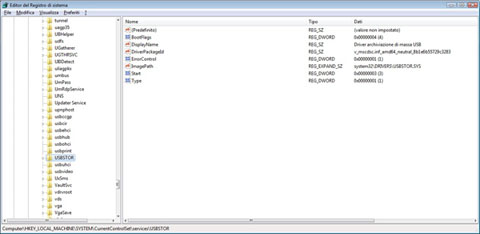
		<content type="text/html" mode="escaped"><![CDATA[In Windows, per poter attivare o disattivare il riconoscimento automatico delle usb pen, basta modificare il valore della propriet&agrave; "Start" nella chiave di registro "HKEY_LOCAL_MACHINE\SYSTEM\CurrentControlSet\Services\UsbStor". In particolare il valore "3" attiva il riconoscimento e il valore "4" lo disattiva. <br /><br /><img src="/public/usbstor2.jpg" alt="Usb storage" />]]></content>
		<link rel="alternate" type="text/html" href="http://www.juniorsoft.it/dblog/articolo.asp?articolo=11"/>
		<issued>2011-03-25T17:46:05+01:00</issued>
		<modified>2011-03-25T17:46:05+01:00</modified>
		<slash:comments>6625</slash:comments>
		<wfw:comments>http://www.juniorsoft.it/dblog/articolo.asp?articolo=11#commenti</wfw:comments>
	</entry>
</feed>